100% Data Recovery from a Western Digital 3TB Hard Drive Requiring Head and PCB Replacement
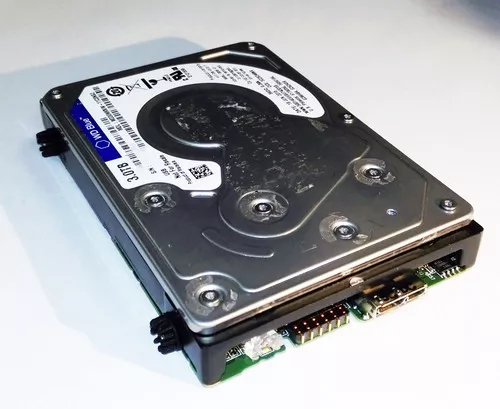
This data recovery case involved a Western Digital 3TB hard drive with printed circuit board (PCB) number 2060-800041-000 REUP1. The drive had experienced both an electronic failure and an internal mechanical failure, preventing it from operating normally.
Recovering the customer's data required repairs to both the drive's electronics and its internal read-and-write head assembly. After carefully performing a compatible PCB replacement and head assembly replacement, we successfully recovered 100% of the customer's data.
When More Than One Component Fails
Many hard drive failures involve a single problem, such as damaged electronics or failing read heads. However, some cases involve multiple failures occurring at the same time.
In this recovery, both the electronic components and the internal head assembly required attention before the drive could safely access the information stored on the magnetic platters.
Because the drive could not operate reliably in its original condition, specialized recovery procedures were necessary to restore temporary access to the data.
The Role of the Printed Circuit Board
The printed circuit board (PCB) mounted to the underside of a hard drive is responsible for controlling nearly every electronic function of the drive.
- Power regulation: Distributes and manages electrical power throughout the drive.
- Motor control: Spins the platters at their precise operating speed.
- Communication: Transfers data between the drive and the computer.
- Head control: Coordinates movement of the read-and-write heads across the platter surfaces.
- Drive initialization: Allows the drive to properly identify itself and become accessible.
Modern Western Digital hard drives also contain drive-specific calibration information that is unique to the individual drive. Because of this, installing another PCB alone is generally not sufficient to restore access to the data.
The Importance of the Read-and-Write Heads
Inside every hard drive is a precision head assembly that reads and writes information from the magnetic platter surfaces. These heads float only nanometers above the platters while they spin thousands of times per minute.
If the heads become damaged, worn, or unable to read the recorded magnetic information accurately, the drive may click repeatedly, fail to initialize, or become completely inaccessible.
Replacing the head assembly is one of the more delicate procedures in professional data recovery. It requires compatible donor components and specialized tools to safely remove and install the heads without causing additional damage to the platter surfaces.
The Recovery Process
Following our evaluation, we determined that both the electronics and the internal head assembly required replacement before the drive could be accessed.
The recovery process involved:
- Diagnosing the electronic and mechanical failures.
- Preparing compatible donor components.
- Replacing the damaged PCB while preserving the drive-specific calibration information.
- Replacing the failed read-and-write head assembly using specialized tools.
- Safely initializing the repaired drive.
- Creating a sector-by-sector copy of the drive to protect the recovered data.
- Verifying the integrity of the recovered files.
As with professional data recovery procedures, the objective was not to permanently repair the hard drive for continued use. Instead, the drive only needed to operate long enough to safely recover the customer's files.
100% Data Recovery Achieved
After completing both the PCB replacement and head assembly replacement, the drive became accessible and we successfully recovered 100% of the customer's data.
This case demonstrates that even when a hard drive suffers multiple simultaneous failures, the stored information may still be recoverable using the proper equipment, compatible donor parts, and specialized recovery techniques.
What to Do If Your Hard Drive Begins Clicking or Stops Working
Hard drives that suffer electronic or internal mechanical failures should be handled carefully to avoid making the damage worse.
- Power the drive off immediately. Continued operation can increase the risk of additional damage.
- Do not continue attempting to start the drive. Repeated startup attempts can place additional stress on damaged components.
- Do not replace the PCB yourself. Modern hard drives often require drive-specific calibration information stored on the original electronics.
- Do not open the hard drive enclosure. The internal components require a controlled environment and specialized tools.
- Have the drive professionally evaluated. Determining whether the failure is electronic, mechanical, firmware-related, or a combination of issues is an important first step toward successful recovery.
Multiple Failures Do Not Always Mean the Data Is Lost
Hard drives that require both electronic repairs and internal component replacement often appear beyond recovery. Fortunately, appearances can be deceiving.
Every recovery case is unique, and no outcome can ever be guaranteed. However, this Western Digital 3TB hard drive demonstrates that even with both PCB and head assembly failures, it was still possible to achieve a complete 100% recovery of the customer's data.