100% Data Recovery from a Hitachi SAS Hard Drive with a Failed PCB
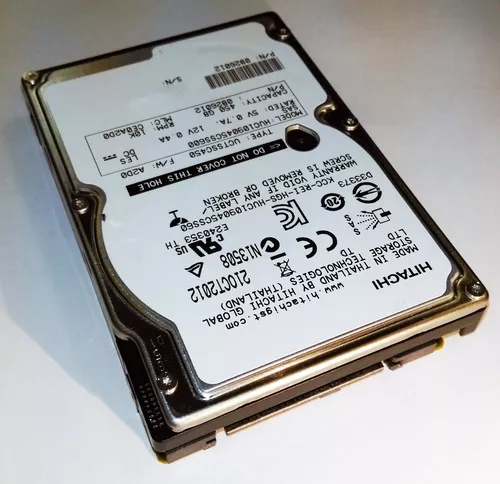
This data recovery case involved a Hitachi SAS (Serial Attached SCSI) hard drive that had suffered an electronic failure. The drive would no longer function because of a failed printed circuit board (PCB), making the stored data inaccessible through normal means.
Although the drive itself would not communicate with the system, we were able to successfully recover 100% of the customer's data.
Understanding SAS Hard Drives
SAS hard drives are commonly found in enterprise environments such as servers, network storage systems (NAS), virtualization platforms, and business workstations. They are designed for continuous operation, high reliability, and demanding workloads.
Unlike standard desktop SATA hard drives, SAS drives are typically used in systems where uptime and data availability are critical. These drives often contain important business records, databases, virtual machines, engineering files, and other mission-critical information.
When a SAS drive fails, simply connecting it to a standard desktop computer is generally not possible. Specialized hardware and compatible interfaces are often required even to begin diagnosing the problem.
The Problem: A Failed PCB
Our evaluation determined that the drive's printed circuit board had failed. The PCB serves as the electronic control center of the hard drive, performing several essential functions including:
- Power management: Distributing and regulating power throughout the drive.
- Motor control: Spinning the platters at their precise operating speed.
- Head control: Positioning the read-and-write heads with extreme accuracy.
- Communication: Managing data transfer between the drive and the host system.
- Drive initialization: Coordinating the startup process required before the drive becomes accessible.
When the PCB fails, the drive may appear completely dead or may fail to initialize properly, preventing access to the data even if the internal platters remain perfectly intact.
Why Replacing the PCB Isn't Always Simple
A common misconception is that a failed hard drive can be repaired simply by installing a circuit board from another identical model. In reality, modern hard drives are considerably more sophisticated.
Many drives store unique calibration information, manufacturing parameters, and adaptive data within a ROM chip or embedded memory on the PCB. This information is matched specifically to the drive's internal mechanical components and is required for proper operation.
Installing a donor PCB without preserving this drive-specific information often results in a drive that still cannot access its data.
For this reason, successful PCB recoveries frequently require more than simply replacing the electronics. The original drive-specific information must also be preserved so the replacement electronics can correctly communicate with the drive's internal components.
The Recovery Process
After diagnosing the electronic failure, we performed the necessary component-level work to restore communication with the drive while preserving the unique information required for proper operation.
Once the electronics were functioning correctly, the drive initialized successfully and we were able to safely access the media. The recovered data was then copied to separate storage rather than relying on the original drive for continued use.
As with all professional data recovery procedures, the objective was not to repair the drive for long-term service. Instead, the goal was to recover the customer's data as safely as possible.
100% Data Recovery Achieved
Despite the failed PCB preventing the drive from functioning normally, we successfully recovered 100% of the customer's data.
This case demonstrates that an electronic failure does not necessarily mean the information stored on the drive has been lost. When the internal media remains healthy, specialized recovery procedures can often restore access to the data without requiring invasive internal repairs.
What to Do If Your Hard Drive Stops Working
If a hard drive suddenly stops being recognized or appears completely dead, taking the proper precautions can improve the likelihood of a successful recovery.
- Stop using the drive immediately. Continued power attempts can sometimes worsen electronic failures.
- Do not swap PCBs yourself. Modern drives often require the original drive-specific calibration information to function correctly.
- Avoid repeatedly reconnecting the drive. Multiple startup attempts may place unnecessary stress on damaged electronics.
- Do not attempt firmware modifications. Incorrect procedures can complicate an otherwise recoverable case.
- Have the drive professionally evaluated. Identifying whether the failure is electronic, mechanical, or firmware-related is the first step toward determining the most appropriate recovery method.
A Failed PCB Doesn't Always Mean Your Data Is Lost
Electronic failures are among the many reasons a hard drive may suddenly become inaccessible. Fortunately, when the magnetic media itself remains intact, a failed PCB is often a recoverable condition.
Every data recovery case is unique, and no recovery can ever be guaranteed. However, this Hitachi SAS hard drive demonstrates that even when a drive appears completely non-functional due to an electronic failure, successful recovery of all the stored data may still be possible with the proper equipment and expertise.