100% Data Recovery from an Undetected USB Flash Drive
This data recovery case involved a USB flash drive that was no longer recognized by any computer. Regardless of which USB port or system it was connected to, the drive failed to appear, making all of the stored files inaccessible.
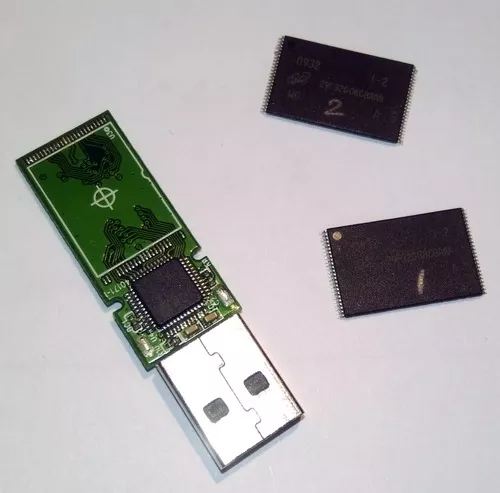
After evaluating the device, we determined that the failure was caused by the flash drive's controller chip. By emulating the function of the failed controller, we were able to successfully recover 100% of the customer's data.
Why a USB Flash Drive May Not Be Detected
When a USB flash drive is plugged into a computer, several electronic components work together before the stored files become accessible. One of the most important components is the controller chip.
The controller acts as the "brain" of the flash drive. It communicates with the computer, manages the flash memory, performs error correction, and translates the raw information stored inside the memory chips into files that your operating system can understand.
If the controller chip fails, the flash memory itself may still contain all of the customer's data, but there is no longer a functioning device capable of interpreting it.
The Challenge
During our evaluation, the flash drive showed no signs of normal operation. Because the controller was no longer functioning correctly, the computer could not identify the device or gain access to the stored information.
Unlike a traditional hard drive, where the data is stored on magnetic platters, USB flash drives store information inside one or more NAND flash memory chips. The controller chip is responsible for organizing that data and compensating for the unique characteristics of flash memory.
Modern flash drives often use advanced techniques such as:
- Wear leveling: Evenly distributing writes across the memory to extend its lifespan.
- Error correction: Detecting and correcting data errors that naturally occur over time.
- Bad block management: Avoiding defective areas of the flash memory.
- Logical-to-physical address translation: Mapping where files are actually stored inside the memory chips.
Because of these processes, simply reading the raw memory chips does not automatically reconstruct the original files.
Controller Chip Emulation
Our evaluation determined that the flash memory itself remained intact, but the controller chip had failed.
Rather than relying on the damaged controller, we used specialized equipment to emulate the controller's behavior. This process allows the raw information stored within the NAND flash memory to be interpreted correctly.
Controller emulation recreates the way the original controller organized the data, making it possible to reconstruct the customer's files even though the original controller electronics are no longer operational.
Because every flash drive design is different, this process requires careful analysis of the flash memory layout, controller architecture, and data organization before recovery can begin.
The Recovery Process
Recovering data from a failed flash drive controller involves much more than repairing electronics. The objective is to reconstruct the data exactly as it was stored within the flash memory.
The recovery process included:
- Diagnosing the controller failure.
- Accessing the raw NAND flash memory.
- Analyzing the flash memory structure.
- Emulating the failed controller.
- Reconstructing the original data layout.
- Recovering the customer's files to separate storage.
- Verifying the recovered data for completeness.
Unlike a conventional repair, the objective was not to restore the flash drive for continued use. Instead, the goal was to recover the valuable information stored within it.
100% Data Recovery Achieved
Despite the complete failure of the controller chip, we successfully recovered 100% of the customer's data.
This case illustrates an important point: a USB flash drive that is no longer detected by a computer does not necessarily mean the stored files have been lost. In many cases, the failure lies within the electronics responsible for accessing the data rather than the flash memory itself.
What to Do If Your USB Flash Drive Is Not Recognized
If your flash drive suddenly stops being detected, the actions you take next can influence the chances of a successful recovery.
- Stop plugging the drive into different computers repeatedly. If the controller has failed, repeated connection attempts are unlikely to help.
- Do not reformat the drive. Formatting may overwrite important file system information if the drive becomes partially accessible.
- Avoid running recovery software. If the drive is not being detected, software recovery tools generally cannot access the data.
- Do not attempt to replace electronic components. Flash drive recoveries often require specialized equipment and controller-specific knowledge.
- Have the device professionally evaluated. Identifying whether the failure involves the controller, flash memory, or physical damage is the first step toward determining the appropriate recovery procedure.
Not Detected Doesn't Always Mean Unrecoverable
Many people assume that a flash drive that no longer appears on a computer is beyond recovery. Fortunately, that is not always the case.
Every data recovery case is unique, and no recovery can ever be guaranteed. However, this USB flash drive demonstrates that even when a failed controller prevents the device from being detected, specialized controller emulation techniques can make it possible to recover all of the stored data.