100% Data Recovery from a Seagate SSHD (Solid State Hybrid Drive) with a Failed PCB
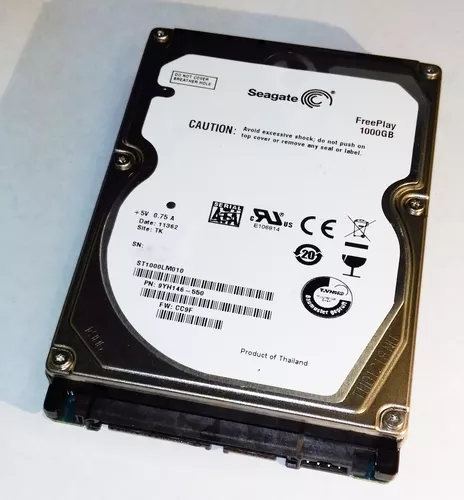
This data recovery case involved a Seagate Solid State Hybrid Drive (SSHD) that had become completely inaccessible. Unlike a traditional hard drive, an SSHD combines a conventional magnetic hard drive with a small solid-state storage component to improve performance.
The drive exhibited a condition where it remained permanently busy and never became ready for normal operation. After diagnosing the failure, we determined the problem originated with the printed circuit board (PCB). Following specialized recovery procedures, we successfully recovered 100% of the customer's data.
What Is a Solid State Hybrid Drive?
A Solid State Hybrid Drive, commonly called an SSHD, combines two storage technologies into a single device:
- Traditional magnetic platters: These store the customer's files just like a conventional hard disk drive.
- A small solid-state memory chip: This stores frequently accessed information to improve system responsiveness and reduce loading times.
To the computer, the SSHD appears as a single hard drive. Internally, however, it is considerably more complex because it must intelligently manage information between the magnetic storage and the onboard flash memory.
This added complexity can make data recovery more challenging than recovering data from a standard hard drive.
The "Always Busy" Problem
During evaluation, the drive never completed its startup sequence. Instead of becoming ready to communicate with the computer, it remained in a continuous busy state.
When a drive is permanently busy, the operating system is unable to access files because the drive never reaches a state where it can respond to normal read requests.
This symptom can be caused by several different types of failures, including firmware problems, damaged electronics, or communication failures within the drive. Careful diagnosis is required to determine the underlying cause before any recovery attempts are made.
The Cause: A Failed PCB
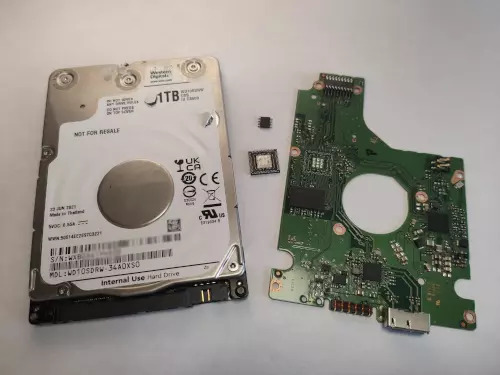
Our evaluation determined that the problem originated with the drive's printed circuit board.
The PCB performs much more than simply supplying power to the drive. It is responsible for:
- Managing power distribution throughout the drive.
- Controlling communication between the drive and the computer.
- Operating the spindle motor that spins the platters.
- Positioning the read-and-write heads with extreme precision.
- Managing the interaction between the magnetic hard drive and the onboard solid-state memory.
- Initializing the drive so it becomes ready for normal operation.
Because SSHDs rely on both traditional hard drive technology and onboard flash storage, failures involving the PCB can affect multiple parts of the drive simultaneously.
Why SSHD Recoveries Can Be More Complex
Unlike a standard hard drive, a hybrid drive contains additional electronic components that work together to improve performance. Although the customer's files are primarily stored on the magnetic platters, the drive also relies on its onboard flash memory and specialized firmware to operate correctly.
Modern Seagate SSHDs also contain drive-specific calibration information stored within their electronics. This information is unique to each drive and allows the internal components to function together properly.
For these reasons, replacing the PCB with one from another drive is generally not enough to restore access to the data. The replacement electronics must still preserve the drive-specific information required for proper operation.
The Recovery Process
After identifying the PCB as the source of the failure, we performed the necessary component-level work to restore communication with the drive while preserving the unique information required for operation.
Once the electronics were functioning correctly, the drive successfully completed its initialization process and exited the permanent busy state.
With stable access restored, we created a sector-by-sector copy of the drive and recovered the customer's files to separate storage.
As with all professional recoveries, the objective was not to permanently repair the original drive but to recover the data as safely as possible.
100% Data Recovery Achieved
Despite the complexity of the hybrid drive design and the permanent busy condition caused by the failed PCB, we successfully recovered 100% of the customer's data.
This case demonstrates that even drives with sophisticated hybrid storage technology can often be successfully recovered when the underlying cause of the failure is correctly identified.
What to Do If Your SSHD Is No Longer Recognized
If your hybrid drive suddenly stops working or remains inaccessible, taking the proper precautions can improve the chances of a successful recovery.
- Stop using the drive immediately. Continued attempts may complicate the recovery process.
- Do not repeatedly reboot the computer. Repeated initialization attempts can place unnecessary stress on failing electronics.
- Do not replace the PCB yourself. SSHDs contain drive-specific calibration information that must be preserved.
- Do not attempt firmware repairs without specialized equipment. Incorrect procedures can make recovery significantly more difficult.
- Have the drive professionally evaluated. Determining whether the failure is electronic, firmware-related, or mechanical is the first step toward selecting the appropriate recovery method.
A Hybrid Drive Failure Doesn't Always Mean the Data Is Lost
Solid State Hybrid Drives are more sophisticated than traditional hard drives, and their failures can be more difficult to diagnose. However, a complex design does not automatically mean the stored information is unrecoverable.
Every data recovery case is unique, and no outcome can ever be guaranteed. In this case, identifying the failed PCB as the cause of the permanent busy condition allowed us to restore communication with the drive and achieve a complete 100% recovery of the customer's data.